
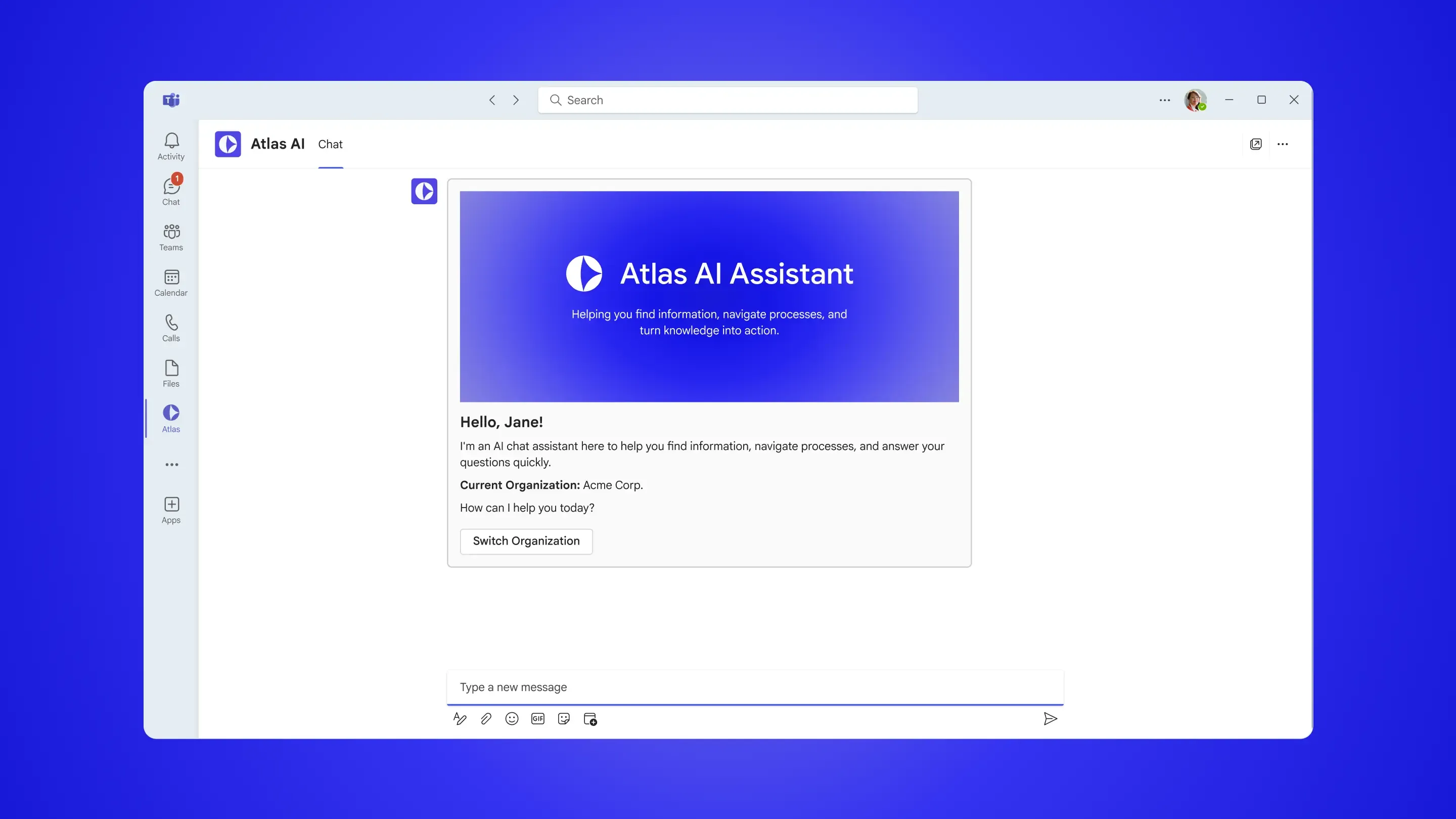
Bringing an Enterprise AI Assistant to Microsoft Teams
Balancing user value and platform constraints through strategic prioritization and tradeoffs.
Expanding access to enterprise AI
For a Fortune 500 healthcare client, I worked on Atlas AI (name changed for confidentiality), an internal AI assistant that helps employees find answers from the company's knowledge base through a web application. To improve accessibility and drive adoption, the client wanted to bring the experience into Microsoft Teams.
I led feature prioritization and interaction design while collaborating on a native Teams experience that balanced user needs with platform constraints.
Increase adoption by 10x
Deliver a native Microsoft Teams experience
Designing within platform constraints
Bringing the AI assistant into Teams was a complex challenge. The existing web application offered a rich set of features, but Teams imposed limitations around navigation, layouts, and interactions.
Key Challenges:
- Adapt the experience to Teams' interaction constraints
- Preserve the core AI experience within platform limitations
- Leverage existing backend capabilities without requiring major changes
Choosing the right implementation approach
Before designing the Teams experience, we evaluated two implementation approaches to determine which best balanced user needs, platform constraints, and long-term maintainability.
Approach 1: Native Teams Experience
Strengths
- Uses Teams components
- Faster implementation
- Easier to maintain long-term
Considerations
- Required adapting to Teams interaction patterns
- Some web features could not be carried over
Approach 2: Embedded Web App Experience
Strengths
- Retained existing functionalities
- Allowed more UI flexibility
Considerations
- Required maintaining a separate frontend
- Felt less native within Teams
Recommended Approach: Teams Experience
Native Experience
Created an experience that felt integrated within Microsoft Teams rather than embedded.
Lower Long-Term Complexity
Leveraged the existing backend while avoiding the cost of maintaining a second frontend.
Supports Teams Everywhere
Worked consistently across desktop, web, and mobile versions of Microsoft Teams.
Defining the Teams experience
With Teams introducing new constraints, we evaluated Atlas AI's existing features to determine which experiences were essential for the MVP.
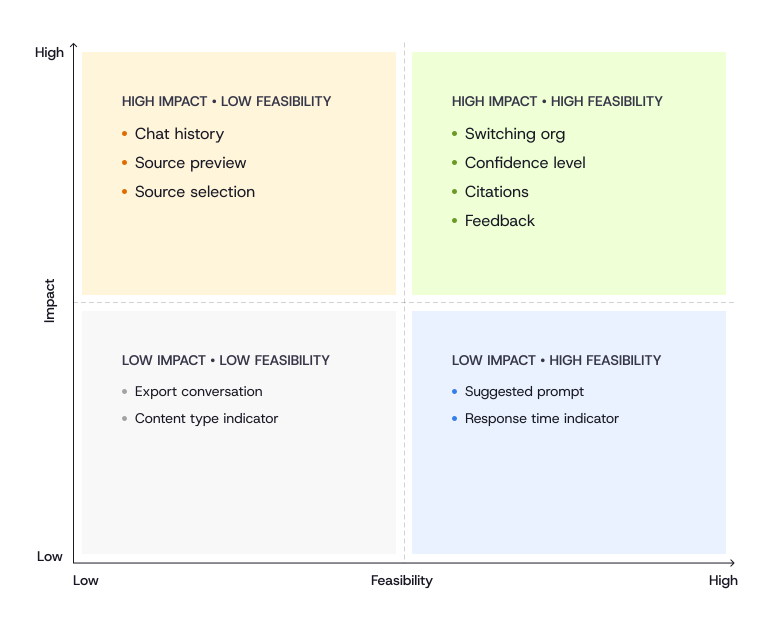
We prioritized features based on user impact and feasibility within the Teams environment.
The prioritization helped define a focused Teams experience by identifying the features that delivered the most value while removing complexity that did not fit the platform.
Included in the Teams Experience
Organization switching
Kept information relevant across organizations
Citations
Helped users trust AI responses
Feedback
Allowed users to provide feedback
Excluded from the Teams Experience
Chat history
Omitted due to Teams platform limitations
Source selection
Omitted to simplify the workflow
Side Navigation
Replaced with conversational navigation
Only selected features are shown. Some features have been omitted or generalized to comply with NDA requirements.
Designing within Teams constraints
Adaptive Cards became the foundation of the Teams experience. I designed reusable components for key interactions, making the experience feel native to Teams and supporting the prioritized features.
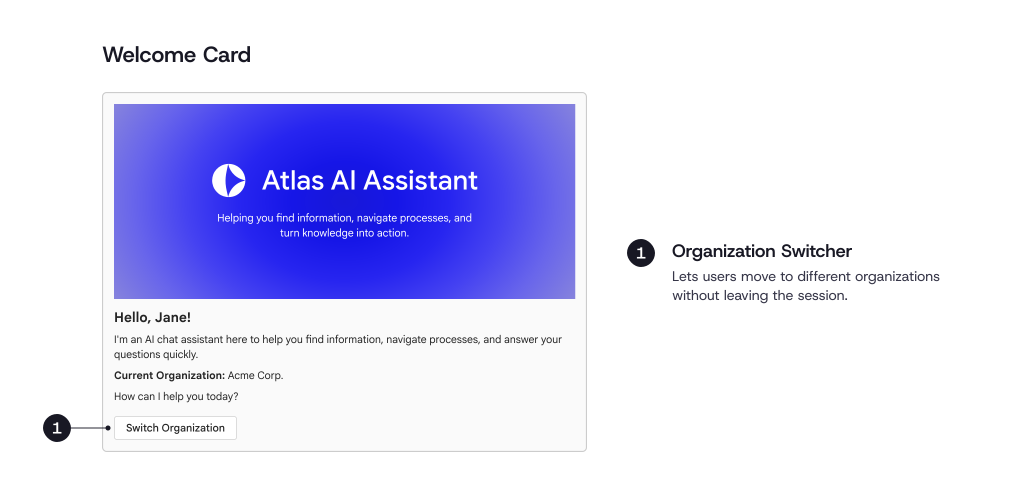
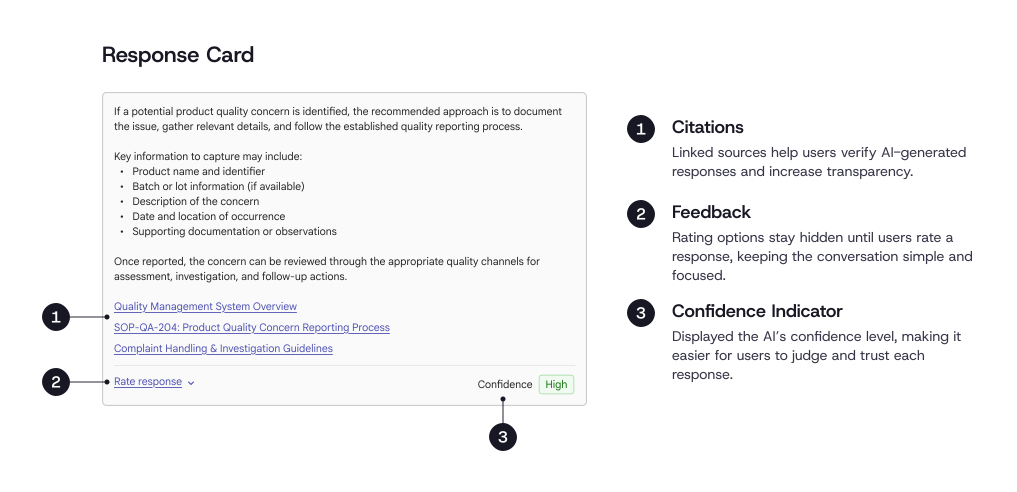
The final solution brought the AI assistant directly into Teams, making it more accessible while working within the platform's constraints and the existing technical architecture.
Native Teams experience
Delivered a solution that felt native instead of simply embedding the existing web application.
No major backend changes
Reused the existing backend, minimizing engineering effort and long-term maintenance.
Built for scalability
Established a maintainable Teams experience that can support broader adoption across the organization.
Good product design starts with the right decisions
This project showed that designing a great experience isn't always about adding more features. Sometimes the biggest impact comes from defining the right scope, making thoughtful tradeoffs, and designing within technical constraints.
By aligning user needs with platform capabilities early, we delivered a solution that felt native to Teams without adding complexity. It was a reminder that good product design is as much about smart decisions as it is about making great experiences.